

By CrowdSent Blog Team
If you find MT5 symbols missing while your account is already connected, start with the instrument list. A short Market Watch display does not establish which instruments the account can access, and a familiar-looking name does not establish an identical contract.
This guide begins after you have confirmed the intended account and server. It covers the documented MT5 desktop workflow. Mobile and web layouts may differ. The goal is a clear description of the missing instrument and the evidence behind it, without placing an order to test access.
MT5 symbols missing: a connected-account decision tree
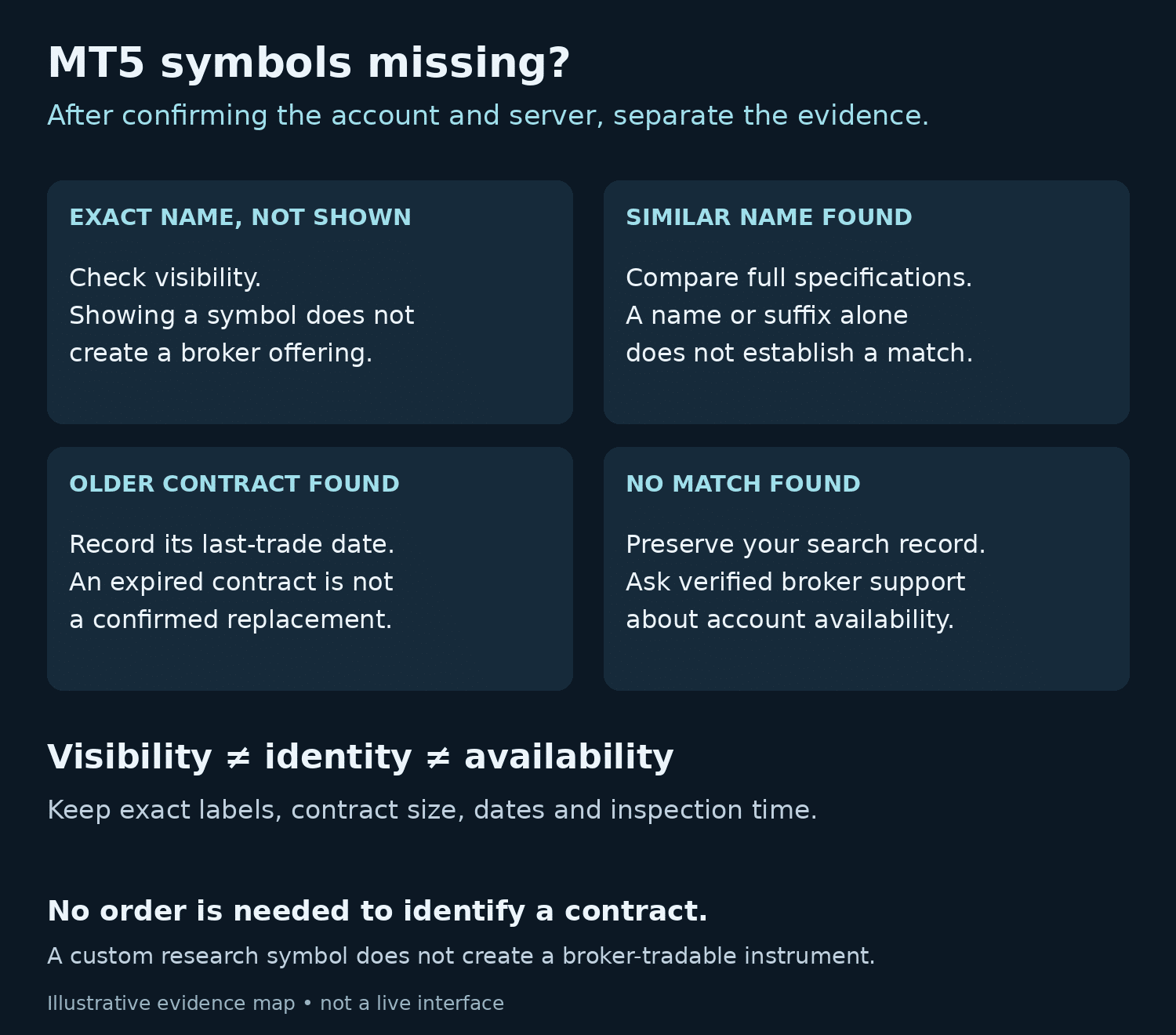
Read each branch in order and stop when the next step requires broker clarification. Record what you observed rather than choosing a cause from memory.
- The exact name is present but absent from your working list: investigate visibility. After showing it, check its description before using the chart for research.
- A similar name is present: compare its contract identity with the instrument you expected. A resemblance is a search lead, not a confirmed match.
- Only an older dated contract appears: record its end date and ask which instrument, if any, is the relevant current counterpart.
- No matching broker instrument appears: preserve the search terms and ask whether that instrument is available for this account and server.
- The instrument is present but its data or permissions raise another question: describe that symptom separately. Finding the name has resolved the search question, not every access question.
MetaQuotes’ symbol properties reference distinguishes existence, selection, visibility and trading-related properties. Keeping these states separate makes a support request much more precise than “MT5 is broken.”
Check the documented visibility and expiry controls
In the desktop Market Watch documentation, the Symbols command in the context menu opens symbol management. Search can use a symbol’s name or description. Show and Hide control whether a selected instrument appears in Market Watch.
The same documentation explains that expired instruments are normally hidden in symbol management. “Show expired contracts” reveals them; the recorded Last trade parameter determines expiry. This can explain why a name in an older research note is difficult to find.
A visibility change does not create a broker offering. Likewise, revealing an expired contract does not make it current. Keep the original dated name in any historical note so that a different contract is not silently substituted.
Compare the full contract identity
The label is the beginning of the comparison. Two instruments may refer to the same broad asset while using different quantities, currencies or contract dates. A suffix has no dependable meaning until the broker’s documentation explains it.
Open Specification from the symbol’s Market Watch context menu. Make a compact evidence record using the fields that apply:
- Exact symbol name and description, including suffixes and dates
- Broker, server and account category being inspected
- Contract size, price precision and tick size
- Relevant currencies and calculation method
- Minimum, maximum and step for volume
- Start/end dates, session information and displayed trading restrictions
- Inspection time and any unanswered field
Use CrowdSent’s explanation of pips, lots and contract size when a unit needs clarification, and its base and quote currency guide when a pair’s direction is unclear. Keep the displayed specification as evidence for the particular instrument you inspected.
Work through a fictional missing-symbol record
Suppose a research note says “DEMO_METAL_A,” but the connected account shows “DEMO_METAL_B” and “DEMO_METAL_OLD.” These are invented teaching labels, not broker symbols or recommendations.
The first response should not be to replace every occurrence of A with B. Build the comparison first:
- Expected label: DEMO_METAL_A, copied from an undated note whose original account context is unknown.
- Candidate B: visible after the search, with a fictional contract size of 100 units per lot.
- Older candidate: DEMO_METAL_OLD, found in the expired list, with a fictional contract size of 10 units per lot and a last-trade date earlier than the inspection date.
- Missing evidence: whether A referred to either candidate, and whether the original note used the same account/server.
The tenfold difference between 100 and 10 is enough to show why matching the broad asset description would be inadequate. It does not identify the correct replacement. The useful outcome is a bounded question: “What is the exact instrument corresponding to this reference, and which specifications establish the match?”
This also applies when reviewing a bot’s stated symbol requirements. Document the expected instrument and compare it with the actual account contract. A matching fragment of a name cannot establish compatibility.
Keep custom symbols in their documented role
MetaTrader’s custom financial instrument documentation describes creating symbols for charts, analysis and Strategy Tester work. A custom symbol can hold research data when the desired history is unavailable from a broker.
Creating a local label does not add a tradable instrument to the broker’s account offering. In the fictional record, inventing a custom DEMO_METAL_A would still leave the relationship with B unresolved. Keep custom data and broker-provided instruments explicitly labelled in research notes.
Prepare a focused broker-support question
A concise request can contain the following information. Send it through the broker’s independently verified support channel, and include only the account details necessary for that channel.
- Context: intended server, account category and desktop build
- Expected instrument: exact name and where that expectation came from
- Observation: search terms, names found and expiry information
- Specification mismatch: the fields that prevent a confident match
- Question: whether the instrument is offered for this account, and its exact documented identity
Redact unrelated balances, positions and personal details from screenshots. Do not include passwords or authentication codes. If the account is actually read-only, that is a separate access issue: MetaTrader’s authorization documentation says investor access permits viewing and analysis while prohibiting trading.
A dated comparison is especially useful when two people inspect different accounts. Ask each reviewer to retain the exact account category, server label and observation time alongside the symbol fields. Compare those contexts before combining their notes. If one reviewer used a demo account and the other used a live account, label that difference explicitly. Agreement on a familiar ticker is not enough to merge the records, and disagreement does not establish an error without the provider-specific specifications.
Build a comparison card instead of choosing the nearest name
A useful missing-symbol investigation can end with a comparison card rather than a replacement symbol. Consider two fictional candidates, EXAMPLE_A and EXAMPLE_B, found under similar descriptions. Both display prices with two decimal places. Candidate A has a displayed minimum price change of 0.05; Candidate B uses 0.01. The matching number of decimal places does not make their price increments identical.
This distinction is documented separately as price precision and minimum price change in the MetaQuotes symbol-properties reference. In the invented case, a move from 50.00 to 50.05 is one minimum increment for A but five for B. That comparison describes price units only. It does not calculate money gained or lost, prove a shared underlying contract, or recommend either instrument.
Add the original evidence beside each comparison. A practical card has four short parts:
- Expected instrument: the exact reference in your research note, together with the note’s date and source.
- Candidate observation: the complete displayed name, description and relevant specification fields, captured under a known account/server context.
- Match status: confirmed agreement, confirmed difference or information still missing for each field.
- Decision boundary: what the available evidence permits you to say and what still needs the broker’s explanation.
For example, the card might conclude: “Both candidates have a related description, but their minimum price increments differ. The original reference contains neither an exact contract identifier nor an inspection date. No equivalent replacement has been established.” This is a successful identification result because it prevents an unsupported substitution. It is not a failed exercise merely because no candidate was selected.
Do not turn a symbol search into a data or trading test
Once a candidate appears, record which field you are looking at. The Market Watch documentation distinguishes Bid, Ask and Last, and explains that available statistical fields depend on the broker. A visible name with a blank field therefore deserves a field-specific question. It is not evidence that the name disappeared, that a blank value equals zero, or that every data channel has failed.
Keep the discovery result stable while the next question is investigated. Write “symbol found; Last field unavailable in this observation” rather than changing the case back to “missing symbol.” If you later receive a broker explanation, attach it to that precise field and account context. Avoid applying an answer about one account category to every server or every similarly named instrument.
There is also a practical safety boundary. Market Watch includes trading controls as well as information displays. MetaQuotes warns that Buy or Sell in One Click Trading can send a request without an additional confirmation. This research workflow needs only names, documentation and specification evidence. Do not use those controls to find out whether a candidate is the intended instrument.
When the identity question is resolved, update the research note with the confirmed label and the evidence date. Preserve the earlier label as a historical reference with an explanation of the correction. Do not silently rename old observations, merge different contract histories or assume that a later specification proves the terms that applied when an earlier observation was recorded.
Keep learning with CrowdSent
Explore more explanations in the CrowdSent knowledge base, or review the current CrowdSent membership. Keep source documents and account-specific questions with the relevant provider; this article does not imply that CrowdSent connects to your account, exports its records or resolves broker-access issues.
Frequently asked questions
Does an empty search prove the broker does not offer the asset?
It establishes only what you found under the recorded search and account context. Check the description and expiry visibility, then ask the broker for account-specific confirmation.
Can Show All make an unavailable contract appear?
A display command changes visibility. It does not establish a new broker offering or account permission. Treat an unresolved absence as a question for verified support.
Is an instrument’s suffix a universal contract code?
No universal mapping should be assumed. Preserve the full label and seek its broker-specific meaning. Removing the suffix from a note can erase a useful distinction.
Why keep the name of an expired contract?
It preserves the identity of the historical observation. Replacing it with a newer contract can change the evidence being studied, even when both refer to the same broad asset.
Which candidate should replace the missing label in the worked example?
The example does not provide enough evidence to choose. The differing quantities and missing original context make broker clarification the justified next step.
Does a visible chart prove an instrument is available for trading?
No. Visibility, data and permissions are separate checks. A chart is useful evidence of what is displayed, but it does not resolve every account restriction.
Can a custom symbol repair the broker’s instrument list?
Custom symbols support local analysis and testing. They do not establish broker availability. Keep them labelled so synthetic research data is not confused with an account’s offering.
Should I place an order to find out whether the name is correct?
No order is needed for this identification workflow. The search record, specification and broker response can answer the question without creating financial exposure.
Does matching a bot’s asset name prove compatibility?
No. The exact contract and the bot’s documented requirements need comparison. This guide makes no claim that any CrowdSent bot works with every broker, suffix or account type.
What makes the support record useful?
It separates expectation from observation and names the unresolved question. Exact labels, inspection context and relevant specification differences are more useful than a broad error description.
Source documentation checked 25 October 2026. Educational explanation from the CrowdSent Blog Team. Numerical examples and identifiers are fictional unless stated otherwise. This article does not provide investment recommendations.