

By CrowdSent Blog Team
A MetaTrader 5 no connection message and read-only account access describe different states. Start by recording whether the account session is connected, whether account access is limited, and whether the problem affects the platform or only an added program. An unavailable trading action alone does not identify the cause.
The checklist below is for observation and support preparation on desktop MT5. It does not ask you to place a test order, share a password or weaken a security setting. Interface labels can vary by build, so preserve the wording actually shown in your installation.
Define the symptom before trying a remedy
Write one sentence about what you can observe. “The terminal displays a connection error at 09:14” is more useful than “my account does not work.” “The account is available for viewing, but access is identified as investor” describes another branch. “One indicator reports an error” describes a third.
Also record what remains unknown. A chart already visible on the screen does not, on its own, establish when its values were last refreshed. A missing value should remain missing in your notes; replacing it with zero creates a different factual claim. CrowdSent’s guide to missing data versus zero explains that reporting distinction.
MetaTrader 5 no connection: a read-only decision tree
Follow the branch supported by your observations. If two branches apply, keep two entries rather than assuming they share a cause.
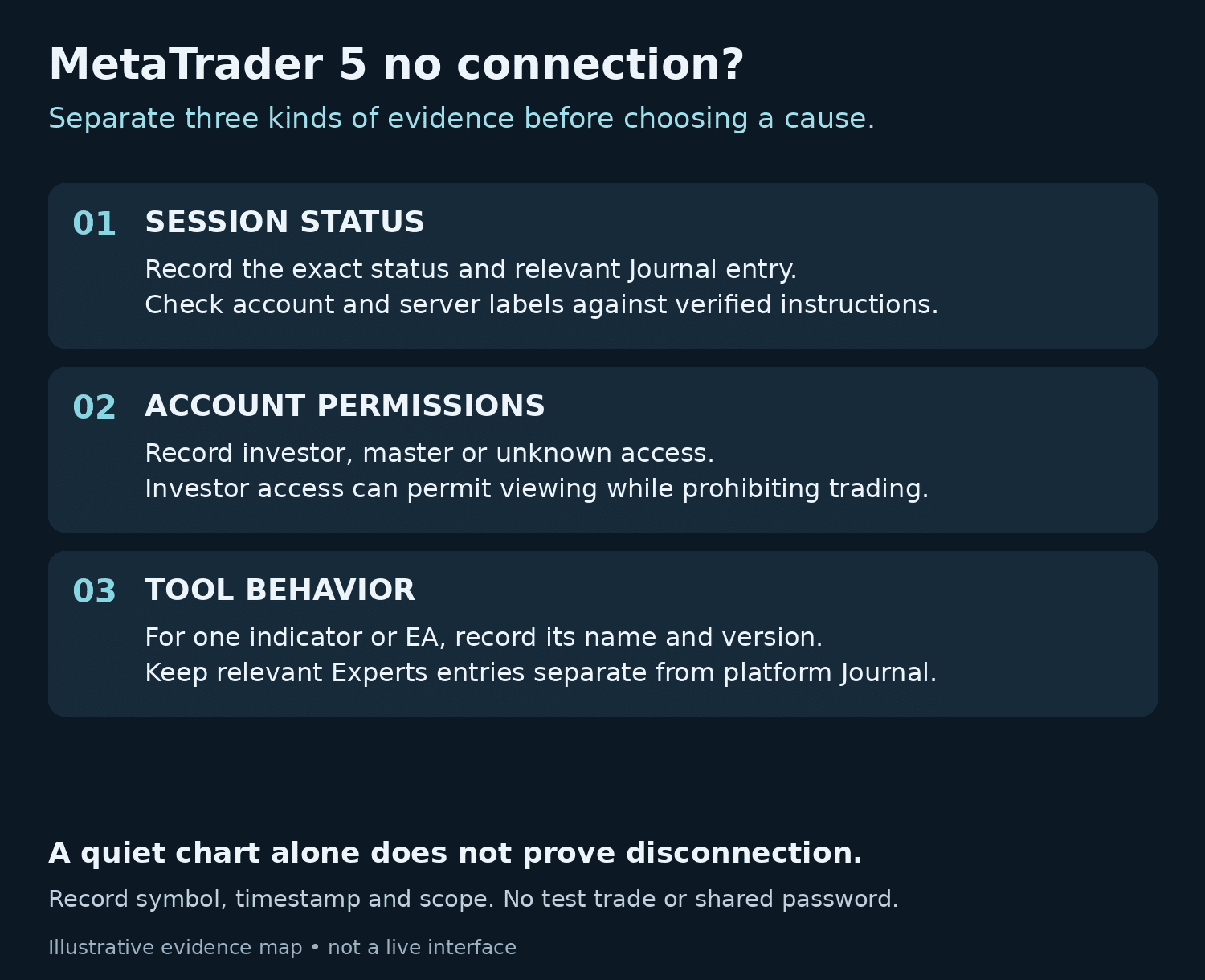
- Is the current account session unconfirmed or showing a connection error? Record the visible status and relevant Journal entry. Compare the selected account and server labels with the broker’s verified instructions. If those labels are uncertain, ask the broker to confirm them through its established channel.
- Is a connected session confirmed, with access identified as investor or read-only? Record the access mode. A restriction on trading is consistent with that mode. Do not use an attempted order as a test.
- Is the session confirmed but a quote or chart appears unchanged? Record the exact symbol, observation time and the timestamp of the displayed data if available. A quiet display needs more context before you can label it a disconnection.
- Is the symptom confined to an indicator or Expert Advisor? Preserve its name, version and relevant Experts entry. Compare this with the platform Journal from the same period, keeping the two sources labelled.
- Does the evidence still conflict? Stop guessing. Send the bounded support record below through the relevant verified channel and identify the unresolved question.
This tree sorts evidence; it does not promise a repair. It is useful even when the final cause is outside the information available to you.
Check the server and account together
The MetaTrader Help Center explains that the broker supplies the account details and server. A correct account login paired with the wrong server cannot establish the intended connection.
Compare the complete server label with the broker’s current instructions, including any distinguishing suffix. Use an independently verified portal or support route. Do not substitute a server address supplied by an unsolicited message or assume that similar labels refer to the same environment.
The goal of this check is a clear statement: “These labels match the provider’s instructions,” or “The correct server is still unconfirmed.” Matching labels narrows the question, but it does not prove that every other part of the session is healthy.
Read-only access is a permissions state
The official MT5 authorization guide distinguishes master from investor access. Investor authorization allows viewing account status, analyzing prices and working with your own Expert Advisors, while prohibiting trading. Therefore, an investor session does not establish that every EA function is disabled.
Describe the access mode you intended and the evidence for the mode actually used. Leave passwords out of the record. If you cannot establish which authorization was supplied, that is a question for the verified account provider, not a reason to experiment with credentials from unknown sources.
Establish the current access mode before considering a permissions change. An account-access question may be resolved by an explanation without making any change at all.
Use Journal and Experts for different evidence
According to the MT5 platform-log documentation, Journal contains platform events, while Experts contains activity associated with running indicators and Expert Advisors. Journal timestamps follow the computer’s time zone.
Preserve the small set of entries around the symptom, including enough neighboring context to understand the sequence. Keep the event source and exact message text where possible, but redact personal identifiers and secrets before sharing. Do not paste an entire log into a public conversation by default.
For example, a fictional private note might read: “12 October, 09:14 UTC+05:00; Journal; account identifier masked; connection-related message recorded. At 09:16, one indicator also displayed a warning.” That establishes an observed order of events. It does not establish that the first event caused the second. If another screenshot uses a different clock, label that clock separately before comparing them.
Blank support-record template
Copy these fields into a private note. Fill only what you can verify; “unknown” is an acceptable entry.
- Product and environment: [desktop MT5, operating system, build]
- Symptom in one sentence: [observable behavior, without a guessed cause]
- Observed at: [date, time, time zone]
- Account reference: [masked identifier; demo or live if confirmed]
- Server label: [exact label, checked against verified instructions]
- Session status: [confirmed, unconfirmed, or exact displayed error]
- Access mode: [investor, master, or unknown; no password]
- Relevant source: [Journal, Experts, or another named screen]
- Redacted message: [accurate wording with sensitive data removed]
- Affected scope: [whole platform, one symbol, or one named tool]
- Checks already completed: [action, time and observed result]
- Question for support: [the specific fact or responsibility you need confirmed]
Know when to stop troubleshooting
Stop when the next step would require guessing account details, bypassing a security warning, sharing secrets or changing controls you do not understand. Stop repeating an action when it adds no new evidence. An uncertain account restriction or provider-side availability issue needs clarification through verified support.
For questions about a particular tool, start with that tool’s documentation. The CrowdSent trading-bots overview provides product context; it does not establish the cause of a broker connection symptom. Keep the outcome of each support exchange in the same private timeline.
A worked connection record: reconcile the clocks before the cause
Consider an invented support case involving two colleagues reviewing the same desktop session. One note says, “Connection warning at 09:14.” Another says, “The problem started at 09:44.” Without clock labels, these look like separate incidents thirty minutes apart. Suppose the first note explicitly uses UTC+05:00 and the second explicitly uses UTC+05:30. Both then refer to 04:14 UTC on the same date. This conversion reconciles the timestamps; it does not explain the warning.
The distinction matters when a screenshot, an account display and a log are assembled into one timeline. MetaQuotes documents computer-local timestamps in the platform logs, while the Market Watch guide identifies broker-server time for the last quote arrival. Do not assign either convention to every timestamp in the application. Record the actual field and its documented clock.
For this fictional case, preserve three observations in their original form:
- 04:14 UTC equivalent: a connection-related Journal message appears; its original timestamp and computer offset are retained.
- 04:16 UTC equivalent: the displayed session status is connected, but the last recorded quote for Example Symbol has an earlier server timestamp.
- 04:18 UTC equivalent: a named indicator still displays a warning in Experts, even though the session status remains connected.
These observations support three separate statements. There was a connection-related event; the later session display changed; and the indicator warning persisted. They do not establish that the quote must refresh continuously, that the indicator caused the connection event, or that the account gained trading permission. Those conclusions require different evidence. A compact record can remain useful without choosing one explanation prematurely.
If the broker confirms a planned interruption covering 04:10–04:20 UTC, add that dated response as another source rather than rewriting the original observations. It supports a possible connection between the reported event and maintenance. It does not automatically explain a tool-specific warning that continued afterward. Ask which part of the incident the response actually resolves.
Close the support record with a bounded outcome
A useful recovery note names the symptom that stopped. “The session status showed connected at 04:22 UTC and the account summary became available” is narrower and more reproducible than “everything is fixed.” If the indicator warning remains, leave that branch open. If the quote timestamp cannot be interpreted, mark quote freshness unverified rather than claiming a full data recovery.
Keep an observation and a proposed cause in separate sentences. For example: “The warning no longer appeared during the next inspection. The broker attributed the interruption to maintenance.” The first is your evidence; the second is an attributed explanation. Neither proves uninterrupted service between inspections, and a later recurrence should receive a new timestamp rather than overwrite the earlier recovery.
Finish by recording the next responsible contact and the exact unanswered question. This prevents a session issue, an account-permission question and a third-party-tool issue from circulating as one vague complaint. The process ends when the remaining uncertainty is clearly assigned, not when a risky test order has been attempted.
Keep learning with CrowdSent
Explore more explanations in the CrowdSent knowledge base, or review the current CrowdSent membership. Keep source documents and account-specific questions with the relevant provider; this article does not imply that CrowdSent connects to your account, exports its records or resolves broker-access issues.
Frequently asked questions
Does an “invalid account” message identify one definite cause?
Do not assume that it does. Preserve the exact message and check the intended account-server pairing. Ask the provider to clarify anything the available evidence cannot resolve.
Can I diagnose the session from a connection icon alone?
Record the icon or status, but pair it with time and relevant events. A single visual observation is a weak basis for explaining an intermittent problem.
Should I place a very small trade to test access?
No test trade is needed for this workflow. Use the authorization information, displayed session state and logs. An order would introduce consequences without being necessary for the support record.
Will restarting turn investor access into master access?
A restart is not evidence of broader authorization. Establish which access mode belongs to the session rather than interpreting a newly opened window as a permissions change.
Why do the log time and a screenshot’s clock differ?
Journal uses the computer’s time zone. Another display may use a different clock. Record both labels before matching events; do not silently treat different timestamps as the same time basis.
Can an EA still display information in an investor session?
Investor authorization does not categorically disable all EA activity. Check the program’s documented behavior and the relevant Experts entry; the prohibition on trading remains important.
Does an unchanged price prove that I am disconnected?
No. Record the symbol and data timestamp, then compare them with session evidence. A stationary number alone does not explain whether the display is current or why it is unchanged.
Should I send a full log file immediately?
Start with the minimum relevant, redacted excerpt. If verified support needs a file, review its contents and the intended secure destination before sharing it.
What if the problem disappears before support responds?
Add the time it stopped and the evidence for recovery. Preserve the earlier record. A later working session does not establish what caused the original interruption.
What if master access is confirmed but a function still fails?
Describe the particular failure separately. Broader authorization alone does not explain every operational error. Use the relevant event record and verified support rather than relabelling all failures as connection problems.
Source documentation checked 25 October 2026. Educational explanation from the CrowdSent Blog Team. Numerical examples and identifiers are fictional unless stated otherwise. This article does not provide investment recommendations.