

By CrowdSent Blog Team
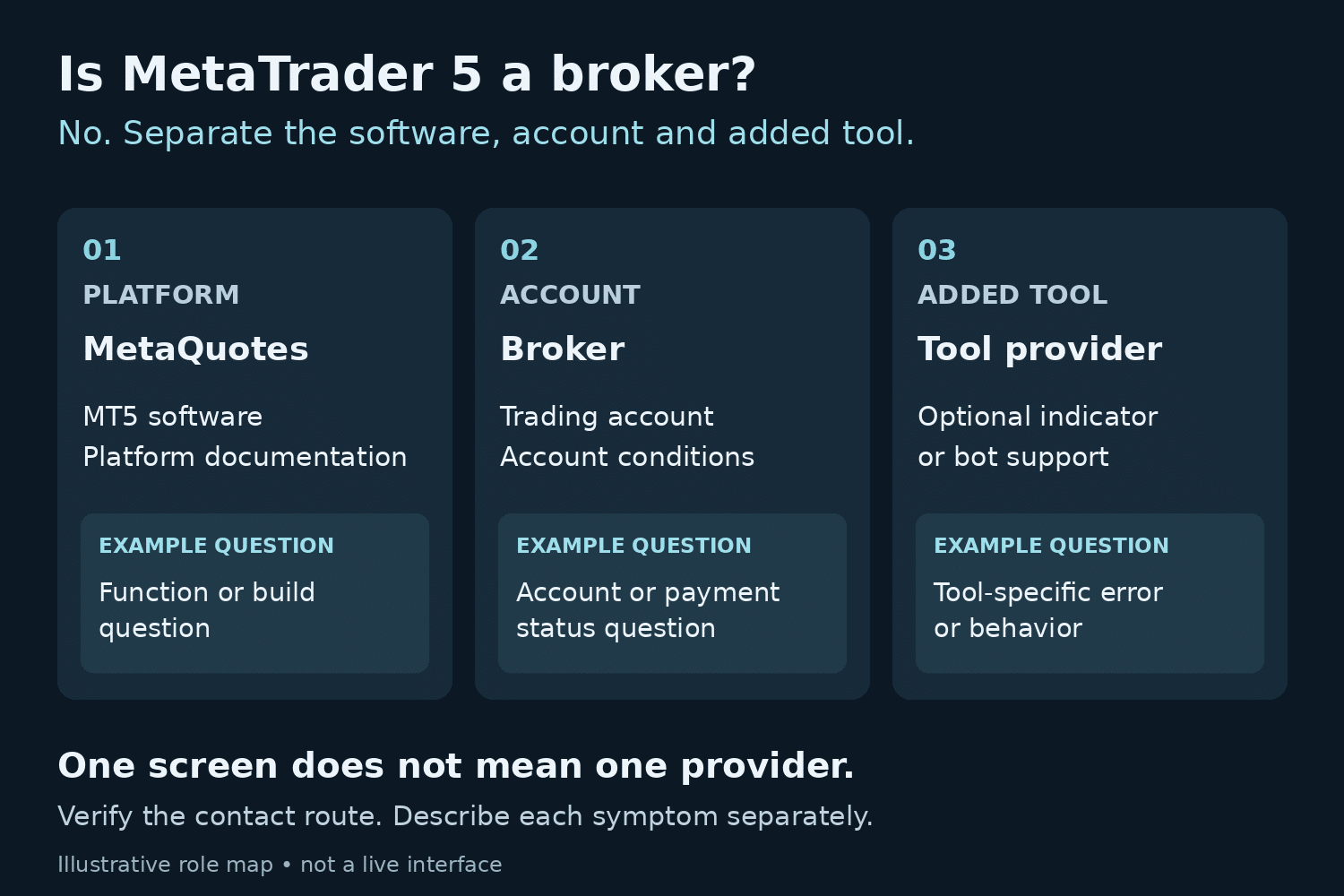
Is MetaTrader 5 a broker? No. MetaTrader 5 is trading software developed by MetaQuotes. The company describes itself as a software developer and says it does not provide investment or brokerage services. Your account relationship needs to be identified separately from the application on your screen. See MetaQuotes’ explanation of its role.
That distinction matters when something goes wrong. A software question, an account question and a question about an optional trading tool can look similar from inside one window. This guide helps you identify the right starting point and prepare a useful, redacted support request. It does not rank brokers or determine whether a service is suitable for you.
Is MetaTrader 5 a broker? Map the three roles
Think of an MT5 setup as three relationships to check. There is the application, the business that provides your trading account, and any additional tool you choose to use. Keep a separate name and verified contact route for each. A shared screen does not mean the same organization supplied everything visible on it.
The MetaTrader Help Center assigns trading accounts, verification, deposits, withdrawals and trading conditions to the broker. It also says the broker supplies account access details and the trading server. The matrix below turns those responsibilities into a practical starting point for support.
A roles-and-responsibilities matrix
On a narrow screen, scroll the table sideways to see every column.
| Issue | First route | Useful preparation |
|---|---|---|
| Account verification status | Broker’s verified account support | Date of your request and its reference, with identity documents kept private |
| Deposit, withdrawal or disputed charge | Broker’s verified account support | Transaction reference and a short timeline, shared through its secure process |
| Account number or server uncertainty | Broker’s verified account support | Server label and a masked account identifier |
| Question about a documented MT5 function | Official platform documentation; then the relevant verified support route | Product, operating system, build and the function involved |
| Error confined to an added indicator or bot | That tool’s documentation or verified provider | Tool name, version and a redacted example of the symptom |
| Unclear responsibility across several components | Start with the component where the symptom is observable | A timeline separating account, platform and tool observations |
The last three rows are a suggested triage method, not a promise that a particular organization can resolve every case. A crash during startup needs a different description from an unexplained account entry. If support redirects you, preserve its explanation so the next person can see what has already been checked.
Keep account identity and access mode separate
A familiar account number is only part of the connection record. Check its associated server against the broker’s verified instructions. Avoid guessing from a similar company or server name.
Access also has a scope. According to the MT5 authorization documentation, investor access permits account viewing and analysis but prohibits trading. Master access has broader account rights. Record which mode was intended without copying either password into a support note.
Use the same discipline for other identities. A website profile, an email address and a trading account identifier may appear in your records, but do not substitute one for another unless the service’s instructions explicitly connect them. Label the identifier you are describing and leave unnecessary details out.
A fictional support case: one screen, two questions
Imagine Maya has a withdrawal-status question and an indicator that displays an error. Her first note says only, “MT5 is broken.” That sends two unrelated issues into one conversation and gives the recipient little to investigate.
A clearer record contains two entries. The first says that a withdrawal request remains unresolved in the account provider’s portal, with the request date and a private reference. The second says that a named indicator displayed an error in a particular desktop build at a recorded time. Neither entry includes a password, full account balance or identification document.
Maya can now route each question to the relevant verified channel and track the replies separately. She has not established the cause of the indicator error or the reason for the unresolved request. She has established what she observed, where she observed it and what answer she needs. Those are useful facts even before a diagnosis exists.
Prepare a redacted support checklist
Before contacting anyone, make a short private record. The goal is to preserve enough context for someone to understand the symptom without disclosing an entire account history.
- Identify the product: desktop, web or mobile; operating system; version or build where available.
- Identify the relevant provider: use a contact route you reached independently through its official service.
- Describe one symptom: state what appeared, what you expected and the screen or component involved.
- Record time: include date, time and time zone. Keep observations from different clocks clearly labelled.
- Preserve relevant wording: copy the error accurately, then remove secrets and unrelated personal or financial information.
- State what you already checked: include only actions actually taken and their observable results.
- Ask a bounded question: for example, “Which support team owns this account-status query?”
- Review attachments: crop or redact a copy, inspect it again, and retain the private original separately.
You can record your research context alongside the support timeline. Keep evidence, possible explanations and the provider’s response in separate entries so an early guess does not become a recorded fact.
What installing MT5 does not establish
An installed application is evidence that software is present. It does not, by itself, establish the legal entity behind an account, completed verification, available funds or permission to use a particular service in your location. Those are separate questions requiring their own records and current, authoritative answers.
For readers in India, Pakistan or elsewhere, avoid treating availability in an app store as a local eligibility determination. If you need that determination, consult the relevant official regulator and the provider’s current legal documentation. This article makes no country-specific regulatory conclusion.
For background on a separate tool category, see the CrowdSent trading-bots overview. Keep questions about a tool’s documented behavior separate from questions about the account itself.
Turn a symptom into a useful support handoff
A responsibility map becomes useful when it changes the question you ask. Rather than sending every team the same collection of screenshots, prepare a short record that lets the first recipient decide whether the issue falls within its scope. The following exercise is an editorial example, not a required provider procedure.
Step 1: separate the observation from its interpretation. “The history panel shows no entries for the selected period” is an observation. “The broker deleted my history” is an interpretation that requires additional evidence. Write the first sentence down before considering the second. Add the exact date range and whether you are looking at a demo or live account. A recipient can investigate a specific display more readily than a conclusion with no supporting detail.
Step 2: name the system that holds the relevant record. An account-provider portal, an MT5 terminal and an optional indicator may each show a different view of related activity. Identify where the disputed information appears and where the authoritative account record is expected to be maintained. Do not assume that an indicator’s display is an account statement. If those views disagree, preserve both observations with their timestamps rather than choosing the one that fits your first explanation.
Step 3: define the answer you need. A useful request might ask which account record explains an entry, which documented setting controls a display, or which provider owns a named component. These are different questions. Asking for the exact record or documentation needed to resolve an uncertainty is more precise than asking a software developer to investigate a payment it does not administer.
Step 4: keep the evidence proportional. For a general interface question, a cropped view of the relevant control may be enough. For an account-specific matter, the provider may require a private case reference through its authenticated support process. Do not put that reference in a public tutorial or forum post. Keep a redacted working copy separate from the original record and check that account numbers, balances and unrelated notifications are not visible.
Step 5: record the handoff without assigning blame. Suppose the account-support team confirms that it manages the underlying account but asks the indicator supplier to explain a calculation. Record the two scopes separately. A referral is evidence of what that team says it handles, not proof that another party caused the problem. Keep the original case reference, the explanation for the referral and the unanswered question together.
Step 6: define a verifiable closing condition. A message saying “resolved” is less useful than a clear outcome. Depending on the question, that outcome might be a written explanation of the relevant account entry, the correct documentation for a function, or confirmation of the responsible support channel. Record what was actually established and what remains uncertain. Do not close a payment question merely because an unrelated display issue disappeared.
This workflow also helps with follow-up. If a response arrives, compare it with the original bounded question before sending another long message. Acknowledge the part it answers in your private notes and isolate the remaining gap. Avoid reopening already explained issues or attaching the entire account history again when only one reference is needed.
For a different kind of account distinction, our guide to MT5 netting and hedging ledgers follows fictional deals through two position models. That article explains record structure; it does not identify the provider responsible for your account. Keeping those learning questions separate makes both guides more useful.
To explore CrowdSent’s current offering, review the membership information. Compare the published features with your research needs. This educational guide does not imply that CrowdSent supplies your trading account, resolves broker disputes or provides a particular MT5 support service.
Frequently asked questions
Can I identify my account provider from the MT5 name alone?
No. Start with the provider named in your account-opening records and verify it through its official service. Avoid treating a logo or a message from an unfamiliar contact as sufficient identification.
Should I send my password to make support faster?
No. Describe the access problem without including passwords or authentication codes. If a request asks for secrets, stop and verify the channel independently before continuing.
Does a working demo account establish my live-account status?
No. Keep demo observations labelled as demo. Check the specific live account’s records rather than carrying assumptions from one environment to another.
Does a balance screenshot prove who holds the funds?
A screenshot provides limited display evidence. It does not independently establish custody, withdrawal availability or the legal entity responsible. Preserve the account agreement and relevant provider records.
Can a bot provider settle my withdrawal question?
Route the account question to the broker. If a separate tool is also involved, ask its provider only about the behavior or records within that tool’s documented scope.
What if the broker’s brand and legal entity names differ?
Record both names as they appear in the account documentation and ask the provider to clarify the relationship. Do not resolve a consequential identity question by guessing from similar branding.
Should I post my full support record in a public forum?
Use a minimal, redacted description for public discussion. Full logs and screenshots may contain identifiers or financial information that is unnecessary for explaining a general software symptom.
Does investor access mean the account is disconnected?
No. Read-only authorization and connection status are different observations. Record each separately so support can distinguish a permissions question from a failed session.
What should I do when two support teams redirect me?
Keep their case references and exact scope explanations. Send a concise timeline through the appropriate verified channel and ask which component or record the next investigation requires.
Is an unanswered support request proof of wrongdoing?
No. Record the elapsed time, commitments and responses without inventing a cause. If the matter is consequential, use the provider’s documented escalation process and appropriate official guidance.
Source documentation checked 25 October 2026. Educational explanation from the CrowdSent Blog Team. Numerical examples and identifiers are fictional unless stated otherwise. This article does not provide investment recommendations.